
The 3D Video Game
Official
Guide
Date : 15/06/2009
Guide Version
: 1.12
Binary
Version : 0.65
Author : Brice
Chevalier
Copyright – Brice
Chevalier – Naiserie dot ca
No
reproduction or modification of this guide is authorized without prior written
and expressed consent of the author.
Table of content 2
Welcome 4
License – Disclaimer 5
Support 6
For downloads and updates: 6
Configurations 7
Operating systems 7
Hardware 8
Installation_ 9
Uninstall 10
About the Game 11
Goal 11
Gameplay_ 12
Player Modes 12
Bonus 15
How to complete a level? 15
Menu options 16
Start game 16
Credits 16
Options 16
Graphic options 16
Other options 17
Help_ 18
Exit 19
Software options – Starting program_ 20
Key reference 21
General Control 21
Specific Mode Control 21
How to - FAQ_ 23
How to_ 23
How to fix a crashed database? 23
How to fix a corrupted database? 23
How to fix a failed job? 23
How to fix a critical locking on a database ? 24
How to kill the hacker process ? 24
Frequent Asked questions 25
I get a Memory Access Violation Error 25
But I did not touch or moved anything, are you sure it is
not a bug ? 25
Can I use my own music during the game ? 25
Can I replace the sprites an Images with one of my own ? 25
In what language the game has been developed? 26
Is crazydba still under development, will there be more
updates ? 26
Will CrazyDBA be ported on Unix™ , Linux™ or MacOS ™ ? 26
Do you plan to release a French version? 26
The database is always getting corrupted, and I always
have to fix something, is the game tuned to hard mode ? 26
In what country CrazyDBA was made in ? 26
Welcome to CrazyDBA.
I am hopeful you
will enjoy playing this game as much as I did developing it. It may
(certainly) not be the most stunning 3D game available on the market, but it
has the benefit of being original. Although it is all public oriented, there
is clearly a core target for this kind of casual game, real DBA and also SYS
ADMIN. In a more general manner all support I.T. staff should find a common
mark.
CrazyDBA is always
under improvement and will meet additional updates.
CrazyDBA is Free,
so enjoy !
Make sure you have read the License and
Agreements if you choose not to comply with this license, do not install or use
the software.
Crazy DBA copyright 2009 - Brice Chevalier version
1.0
- The PROGRAM refers to the Binaries,
source code, documentations, Licences documents, Graphics and sounds,
meshes, textures or any file or resource composing the CrazyDBA (the video
game) Package Or distribution
- Representations, NO Warranties and
Disclaimer
BECAUSE THE PROGRAM (AKA CrazyDBA) IS
LICENSED FREE OF CHARGE, THERE IS NO WARRANTY For THE PROGRAM, To THE EXTENT
PERMITTED BY APPLICABLE LAW.
EXCEPT WHEN OTHERWISE STATED IN WRITING THE
COPYRIGHT HOLDERS AND/OR OTHER PARTIES PROVIDE THE PROGRAM (AS IS) WITHOUT
WARRANTY OF ANY KIND, EITHER EXPRESSED Or IMPLIED, INCLUDING, BUT Not LIMITED
To, THE IMPLIED WARRANTIES OF MERCHANTABILITY And FITNESS For A PARTICULAR
PURPOSE. THE ENTIRE RISK AS To THE QUALITY And PERFORMANCE OF THE PROGRAM IS
WITH YOU. SHOULD THE PROGRAM PROVE DEFECTIVE, YOU ASSUME
THE COST OF ALL NECESSARY SERVICING, REPAIR
Or CORRECTION.
IN NO EVENT UNLESS REQUIRED BY APPLICABLE
LAW Or AGREED To IN WRITING WILL ANY COPYRIGHT HOLDER, Or ANY OTHER PARTY WHO
MAY MODIFY And/Or REDISTRIBUTE THE PROGRAM AS PERMITTED ABOVE, BE LIABLE To YOU
For DAMAGES, INCLUDING ANY GENERAL, SPECIAL, INCIDENTAL Or CONSEQUENTIAL
DAMAGES ARISING OUT OF THE USE Or INABILITY To USE THE PROGRAM (INCLUDING BUT
Not LIMITED To LOSS OF Data Or Data BEING RENDERED INACCURATE Or LOSSES
SUSTAINED BY YOU Or THIRD PARTIES Or A FAILURE OF THE PROGRAM To OPERATE
WITH ANY OTHER PROGRAMS), EVEN If SUCH
HOLDER Or OTHER PARTY HAS BEEN ADVISED OF THE POSSIBILITY OF SUCH DAMAGES.
- This PROGRAM
is free software in the sense that you are free to download, copy And
redistribute it for personal And non-commercial purposes, provided that
the copyright notice is retained in the copy. You are Not allowed To
charge a fee For the software without the consent of the author other than
that To cover the cost of the distribution. If a fee is charged it must be
made clear To the purchaser that the software is freeware And that the fee
is To cover the distributor's costs of providing the software.
- Selling the
PROGRAM Or parts of it Or bundling it into a commercial product Or using
the PROGRAM To promote a commercial product without the author’s consent
is an infringement of the author’s copyrights
- CrazyDBA is not in the public domain: It
is the intellectual property of Brice Chevalier.
- You are NOT
allowed to modify the PROGRAM binary code, licenses, or the documentation
distributed with the Crazydba software package. You are however allowed To
distribute modifications To configurations scripts, meshes, sounds,
textures, Graphics Or the source code, provided that you make it clear To
the recipients that you have made such modifications.
- This program uses some Models and meshes
and textures under the artistic license (see other license for detail)
- All events and elements of this software
are purely fictional and any resemblance with existing elements, entity,
or person would be pure coincidence.
- CrazyDBA is not affiliated with any
database vendor or I.T. Company in any way.
Since the
software is provided “As is”, free of charge, developed exclusively during
spare time, there is no support as such and no guarantees of any kind.
However based on good will, the author might release update and patched
version based on the feedback of player experience. Bugs and issue as well as
player experience enhancements can be reported, but are not guaranteed to be
fixed or taken into consideration. Feedback, bug report, will be welcome in
general as long as it is constructive.
You can email your suggestions to the
following email address :
crazydbasupport@gmail.com
Any abuse will be reported!
Contact
For contact, bug report or any inquiry feel
free to use the following email address :
crazydbasupport@gmail.com
Make sure you have read the support
section first before submitting your demand.
Go the following web site, the official
distribution channel: http://www.cinsiders.com/crazydba
Only Windows platforms are supported,
because this software was developed to be Direct X™ 7 compliant. Unix™, Linux™,
and MacOS™ are NOT supported.
Supported Platforms:
- Windows ™ Vista
- Windows ™ XP (32 and 64 bits)
Windows XP ™
Windows XP ™ Service Pack 1
Windows XP ™ Service Pack 2
Windows Vista ™ (32 bits)
Windows Vista ™ (32 bits) (service Pack 1)
Windows Vista ™ (32 bits) (service Pack 2)
- Non Tested O.S. (Should work)
Windows Vista ™ (64its)
Windows Vista ™ (64 bits) (service Pack 1)
Windows Vista ™ (64 bits) (service Pack 2)
- Non tested O.S (May Work ):
Windows 2000™ professional (Service Pack)
¨
A full Direct X ™ 7.0 100% compatible P.C is
required.
¨
An accelerated graphic card is strongly
recommended
¨
A minimum of 256 MB of memory is required.
The software
should accommodate itself with modest hardware configuration, given current
systems available on the market. However, if you experience unacceptable frame rate,
you can lower the resolution of the game. Common and recommended resolutions
are
640X480,
800X600, 1024X768, 1280X1024 in 16 and 32 bits colors.
If this is not enough you can try the –lowend option, this will start the game with a degraded visual experience.
CPU : AMD Athlon XP (2800 +)™ or Intel
Pentium 4 3.0 Ghz ™
Graphic card : Intel GMA 940™
Memory : 256 MB
CPU : AMD Athlon XP (2800 +)™ or Intel
Pentium 4 3.0 Ghz ™
Graphic card : Nvidia Geforce™ 7000 or 8000
series or ATI Radeon serie™
Memory : 512 MB
CPU : Intel Core duo 2 ™ , core Quad ™ , I7
™or AMD Phenom II x2 x3 x4™
Graphic card : Nvidia Geforce™ 7000 or 8000
series or ATI Radeon serie ™
Memory : 1 GB
Install the
package (auto install executable) in the desired location on your hard drive. Package
comes in a form of an installer. The software needs write access on the file
system to decompress and create configuration files.
Double clicking
on the package archive will start the installation.
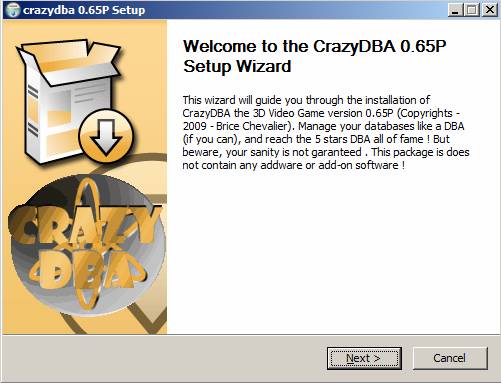
Just follow the installation
instructions. You must accept the license prior to install the software. No
Administrator privilege is required to install, and it will run under perfectly
fine under a classic user account. However Windows Vista™ users with UAC enabled
may need to elevate credentials to administrator as prompt by UAC if the auto
extractible archive is run.
Should you
decide to install the optional source code, please note you need a valid
license of Blitz3D ™
ver1.99 to compile and manage the source code.
The installation
does not create any entry in the registry neither adds dll, or files to
Windows™ system folders. All files are installed in the same directory root
directory (by default crazydba).
Installation
will add a link on the desktop as well as on the start menu (Start- Crazydba -
CrazyDBA )
- To run/start
the program, just run the Crazydba.exe located in the root installation
directory (by default Crazydba) or use the crazydba link/ shortcut created on the desktop and
into the start menu “Start – Crazydba – Crazydba”
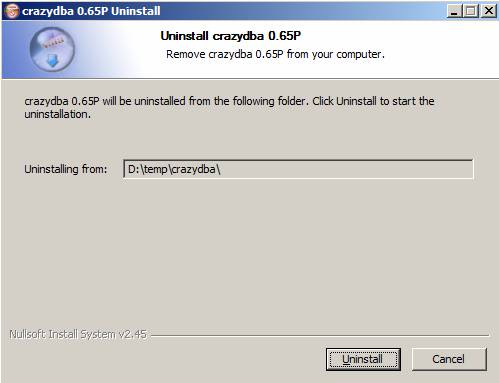
To uninstall run
the uninstall program, in start menu “start - Crazydba – uninstall”. Or you can
decide to manually remove / delete the (Crazydba) root
folder.
Uninstall
software will remove automatically all files and links or shortcuts , it is
preferred de-installation method. Just follow the instructions.
The installation
does not create any entry in the registry neither adds dll or files to Windows™
system folders. All files are installed in the same directory (by default crazydba).
You’ve been
hired by the Global Corporation, as a DBA (Aka Database Administrator) position.
As such, your job is to take good care of your assigned databases. Good news is
this is generally speaking a relatively well paid job. Bad news is this a very
demanding job, the Global Corporation has a lot of clients to serve, and your
sanity is not guaranteed.
You’ll be
transferred to the “island” to perform your duty. Unfortunately, for your sake,
all other DBA have deserted the “island”. Details are not clear why no other
team member or backup will be available, but one thing is sure, you will be on
your own.
Databases can get
locked, crash, get corrupted, or get attacked by rogue hacker processes. You
will get paged in these cases. Be pro-active and avoid these situations or fix
them quickly.
Besides your
databases you must also take good care of yourself, since you will be
constantly under pressure you can easily end in burn out if your stress gets
too high. To prevent this, avoid being paged, and fix quickly issues as they
come, after all this is what you are paid for!
Only when a
database is healthy and running it can commit transactions, meaning money for
the Global Corporation. In other words, as long as your database is behaving
correctly it will be available to end-users and processes will shoot
transactions generating some Cash money and increasing your Trust level.
To complete a
level you have to achieve a certain amount of transactions. This value will
increase with the level difficulty as well as the number of database to manage.
In addition to
databases, you must also take care of batch jobs (or more simply jobs) if they
fail. Jobs are essentials for the good behaviour of the databases and for your
client’s business. You do not need to know what they do, but only if they
succeed or fail.
Your databases
require constant care and monitoring, if you let things go it is likely you
will lose the game quickly. By managing your database and fixing issues you
will gain Cash (your SCORE), and Trust value.
The more trust
the better. With dedication and hard work you may reach the “five stars” DBA
stardom, and who knows, get enough cash to retire for the rest of your life …
The Stress value
evaluates how tired or Stressed you are, if you let this value reach 2000 you
end in BURN OUT and lose the game.
If your Trust
level drops to zero you get fired and lose the game, the Global Corporation
does not spend its money on unreliable asset.
To manage your
databases you have to split your job into different tasks. As such different mode
have been set and can be activated by pressing function keys [F1] to [F6] .
To perform an action such as issuing a backup, recycling the database, clearing
some corruption or killing a rogue process you will have to switch to the
appropriate game mode.
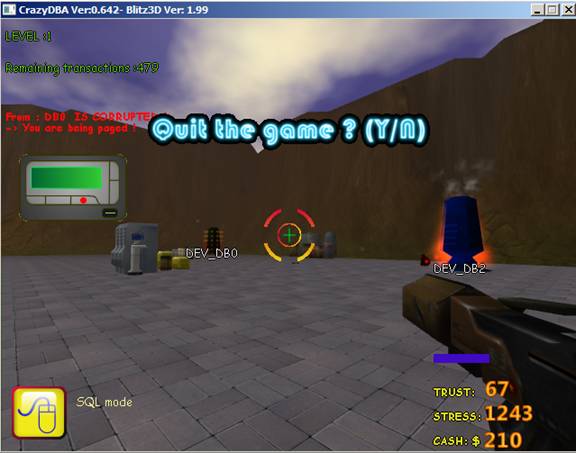
Each mode is designated
by an icon appearing in the corner of the screen. By default the SQL mode is
activated when the game begins.
 SQL MODE - [F1] key
The SQL mode is
used to query the database and correct corruption. At your disposal the SQL
cannon is enabled when SQL mode is set, SQL cannon can fix corruption pretty
easily but it has short range. Make sure you are close enough to clear
corruption. The more corrupted the database is, the more you will need to fire
the SQL cannon.
You can also query the database, when query
mode is set. You will notice rotating shapes around the selected database. The
selected Query is green glowing and rotating on itself. Available SQL queries
are: Select, insert, update, delete. Be careful about what you are doing while
querying the database.
SQL Mode
key reference
[F1] To
activate / Set Mode
[MOUSE
Left Click]/[SPACE BAR] Fire the SQL cannon (fix corruption)
[MOUSE
Right Click] Access database for SQL
Query
[BackSpace]
Cancel/log off Database access
[I] Insert
SQL query (query mode must be set)
[S] Select
SQL query (query mode must be set)
[D] Delete
SQL query (query mode must be set)
[U] Update
SQL query (query mode must be set)
 KILL MODE
- [F2]
key
KILL MODE
- [F2]
key
The kill mode is
used to get rid of “parasite” or rogues locking processes and connexions. This
is the defence mode you need to use to get rid of locking or Hacker process who
tries to steal information from your databases. Kill mode is all powerful; it
will kill good and bad processes without distinction. However you can not harm
your database or kill it in this mode. Sniper mode, will help you focus on the
targets, the weapon used in the kill mode has a long range.
KILL
Mode key reference
[F2] To
activate / Set Mode
[MOUSE
Left Click]/[SPACE BAR] Fire the gun
[MOUSE
Right Click] Set sniper mode ON/OFF
 BACKUP MODE
- [F3] key
BACKUP MODE
- [F3] key
The Backup mode
enables to run backups on databases. Backups are is safest way to recover the
database in case of a crash. You should always backup your databases. When a
backup is on going if you are close enough to the database you will notice the
backup progress.
BACKUP
Mode key reference
[F3] To
activate / Set Mode
[MOUSE
Left Click] Trigger a backup
You must
aim to a database for a backup to work
 RESTORE MODE - [F4] key
Restore mode
enables to restore a previous database backup. A previous database backup must
have been made for the restore to be valid. Restoring a backup is the ONLY 100%
safe method to recover from a crash.
RESTORE
Mode key reference
[F4] To
activate / Set Mode
[MOUSE
Left Click] Trigger a Restore
You must
aim to a database for a restore to work
 RECYCLE MODE - [F5] key
Recycle mode, is
an emergency mode to recycle (bounce) a database. Recycling means shutdown
restart in the same operation. Recycle mode may be applied when a database is
crashed. It will recover the database the hard way. Recycling has a 50% chance
of success each time and a 50% chance of corrupting your database once
recovered. Recycle mode should only be used as last resort when a database is
crashed.
You may find
recycling is a fast a convenient way of recovering but is it less safer than
reloading a backup.
RECYCLE
Mode key reference
[F5] To
activate / Set Mode
[MOUSE
Left Click] Recycle/emergency restart
Works
ONLY if the database is crashed
 CONSOLE MODE - [F6] key
Console mode,
should be switched on when you need to handle jobs or failing ones. The Console
mode enables to connect to the mainframe via a console / terminal (You can only
connect to a terminal when the console mode is set). Should a job fail, Get
close to a console/Terminal and keep the [SPACE BAR] or [Mouse left click]
pressed while fixing the job.
CONSOLE
Mode key reference
[F6] To
activate / Set Mode
[MOUSE
Left Click]/[SPACE BAR] Access a Terminal and log on to the mainframe
 Throughout
the game, when a certain amount of transaction is committed (100), a bonus will
spawn. A message will indicate at the same time, the bonus is ready to be
collected. Bonuses are golden rotating stars placed at certain location on the level;
you must walk or run though them to acquire them. You may need to search the
level for bonuses as they may be hidden in strange places. Once acquired a
bonus item will appear stating a bonus is available to be triggered via [B] key,
the more item, the more bonus you can trigger. Bonus will produce two effects
when activated:
Throughout
the game, when a certain amount of transaction is committed (100), a bonus will
spawn. A message will indicate at the same time, the bonus is ready to be
collected. Bonuses are golden rotating stars placed at certain location on the level;
you must walk or run though them to acquire them. You may need to search the
level for bonuses as they may be hidden in strange places. Once acquired a
bonus item will appear stating a bonus is available to be triggered via [B] key,
the more item, the more bonus you can trigger. Bonus will produce two effects
when activated:
¨
It will boost your score
¨
It will reset your stress down to zero
Use bonuses
wisely, they can save you from situations when your stress meter gets too high
and buy you some extra time.
Remember, you
need to collect a bonus before activate it!
To activate a
bonus use the [B]
key
To win the game
or just a level, keep you Trust and Stress value within an acceptable range. TRUST
should be as high as possible STRESS should be as low as possible. You also
need to let your databases process the required number of transactions this
value will increase for each level difficulty (with the number of databases).
The number of
required transactions will decrease during the game play, when it reaches zero
, the level is completed , congratulations !
You gain Trust
and Cash with time and processed transaction. Fixing issues the RIGHT way will
also boost your CASH and TRUST level.
In addition use
Bonuses wisely, they can temporally save you from a critical situation and
extend your sanity level.
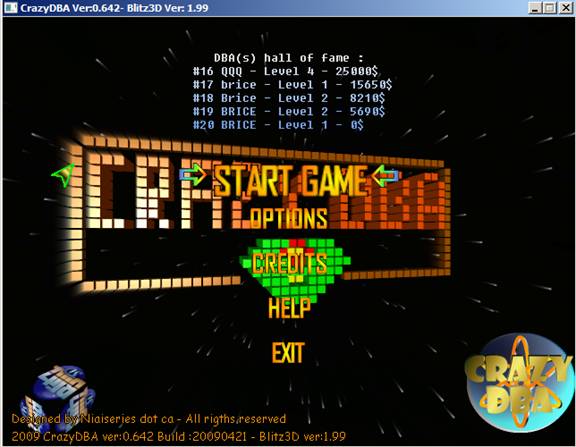
Just start a new game
Display some credits
Enable to deal with game options
Graphic option
and resolution can be set to your need. To take effect the game has to be
restarted. By default the game will start in SVGA (640X480 16 bits colors). The
resolution is saved in configuration file (crazydba.cfg), do not try to edit
this file as it is created in binary mode.
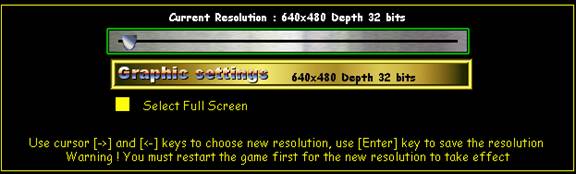
You can change the resolution as you whish.
Current resolution is displayed in the upper side.
¨
To browse through available resolutions use cursor
keys [ß]¸and [à]
¨
To validate and save use the [Enter] key. A
confirmation message will pop up (use Y to confirm)
¨
Select Full screen check box will enable when
checked the full screen mode
- Tutorial
mode: This option is enabled by default.
Tutorial will temporary (5 min) walk trough the player throughout events
that will occur in the game by displaying friendly pop up message to guide
him with a resolution. This is a basic tutorial mode to help beginners to
get acquainted with the game. It will provide a problem / solution remedy.
- Crazy Mode : The crazy mode is a difficult and more challenging mode for
experienced player who whish to get into real action right from the start.
You’ll start the game with 15 databases to manage instead of the default
5. You can increase you score more rapidly and so are your odds of losing.
- True Pager
sound : When this option is enabled , the
pager alert will sound like the REAL pager tone / “music” most real I.T.
operational are familiar with. This can get on your nerves very quickly!

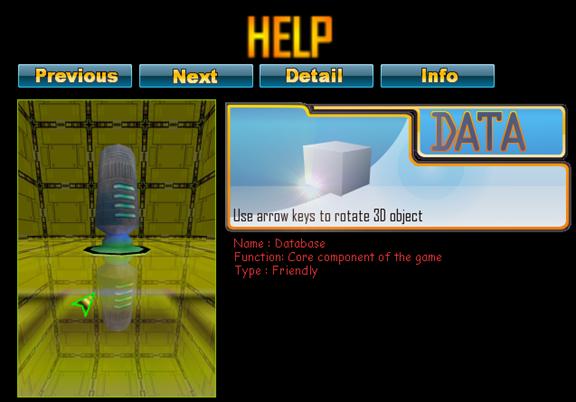
Help menu section
is where most of the information and help regarding game is available. Main
help section will display in 3D core objects of the game with a brief
description.
- You can browse though objects using the “Previous”
and “Next” button
- The “detail” button gives a more complete
info regarding the current object
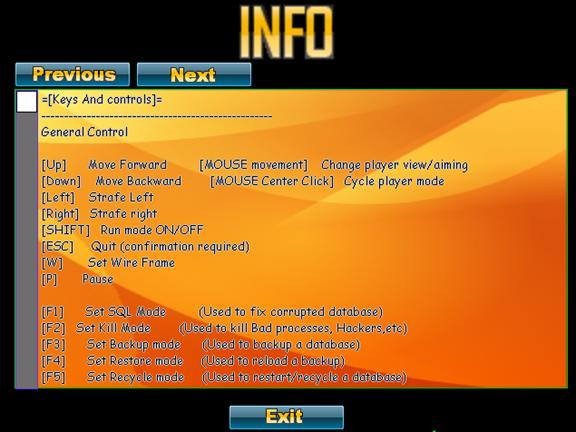
- The “info” button will open a textual,
scrollable help. It the prime source of information regarding the game
,and includes FAQ , Key maps, License info
You can scroll
the text of the info screen using the mouse, and the scroll bar.
The info screen is trigged by the info
button.
¨
You can scroll the text of the info screen using
the mouse, and the scroll bar.
¨
You can browse pages objects using the
“Previous” and “Next” button
Exit menu option
exits/quits the game gracefully, if you answer [y] to the confirmation message.
Clicking on the closing window widget (if not in full screen) will have the
same effect.
Exit button close the current screen / page
and returns back to main menu or previous page.
- To start the program without option
(normal mode) simply double click on the crazydba.exe
file
Software Options
are not be confused with the menu options. These options are provided with the Binary
/ executable when the software is launched. It will enable special features built
into the software.
To provide the
software with option you will need to run / start it from a command/console
window since the classic “double clicking” will not work. You can also create
a batch (.bat) file with the required option.
Options are CASE
SENSISTIVE.
Available options are :
-help display
the help option for the software
-svga
force the resolution in pure SVGA 640X480 16
bits
-svga32
force the resolution in pure SVGA 640X480 32 bits
-debug run in
debug mode, will display debug info (might slow down)
-lowend
will start the game with a degraded visual
experience.
To use an option (you can add multiple of
them but some override each other) :
For example to display the help options of
the game :
crazydba.exe
–help
If no option is used the software runs in
normal mode.
A batch (.bat) file would look like this:
@echo
off
set
APPLICATION=crazy dba
echo
"starting %APPLICATION%"
start
crazydba.exe –help
[Up] Move
Forward
[Down] Move
Backward
[à] Strafe Left
[ß] Strafe right
[MOUSE
movement] Change player view/aiming
[MOUSE Center Click] Cycle player mode
[SHIFT]
Run mode ON/OFF
[P] Pause
the game
[ESC] Quit
(confirmation required)
[B] Activate
bonus
[ctrl]+[W] Set
Wire Frame mode
[ctrl]+[A] Set
anti alias
[ctrl]+[B] set
Buffer mode
[F1]
Set SQL Mode (Used to fix corrupted database)
[F2] Set
Kill Mode (Used to kill Bad processes, Hackers,etc)
[F3]
Set Backup mode (Used to backup a database)
[F4]
Set Restore mode (Used to reload a backup)
[F5]
Set Recycle mode (Used to restart/recycle a database)
[F6]
Set Consol mode (Used to access the Mainframe and fix jobs)
ð
SQL Mode
([F1] key)
[MOUSE
Left Click]/[SPACE BAR] Fire the SQL cannon (fix corruption)
[MOUSE
Right Click] Access database for SQL
Query
[BackSpace]
Cancel/log off Database access
[I] Insert
SQL query (query mode must be set)
[S] Select
SQL query (query mode must be set)
[D] Delete
SQL query (query mode must be set)
[U] Update
SQL query (query mode must be set)
ð
KILL Mode
([F2] key)
[MOUSE
Left Click]/[SPACE BAR] Fire the gun
[MOUSE
Right Click] Set sniper mode ON/OFF
ð
BACKUP Mode
([F3] key)
[MOUSE
Left Click] Trigger a backup
You must
aim to a database for a backup to work
ð
RESTORE Mode
([F4] key)
[MOUSE
Left Click] Trigger a Restore
You must
aim to a database for a restore to work
ð
RECYCLE Mode
([F5] key)
[MOUSE
Left Click] Recycle/emergency restart
Works ONLY
if the database is crashed
ð
CONSOLE Mode
([F6] key)
[MOUSE
Left Click]/[SPACE BAR] Access a Terminal and log on to the mainframe
When a database
is crashed its appearance is blue and the database is smoking. A crashed
database is the WORST case scenario, and you must recover the db within seconds
before your stress meter gets too high.
The safest way
to recover a crashed database is to reload a backup ([F4] key) under the
Restore Mode, but a backup MUST have been made first prior to the crash. If no
backup is available, your only option is to recycle the database the hard Way.
Switch to
RECYCLE MODE ([F5]) and recycle the server. Recycling has a 50% chance of
success each time and a 50% chance of corrupting your database once recovered.
Recycle mode
should only be used as last resort!
When a database
is corrupted it will turn dark green and database corruption will be visible. Red
tiles represent the corrupted data blocks, orange tiles the correct data
blocks. The more Red tiles you have, the more sever the corruption is.
To fix it,
switch To SQL Mode ([F1] key) and fire the SQL Cannon on the database. You will
notice red tiles being turned into orange while the corruption is being fixed.
When the DB is repaired, it will resume its behaviour. You may need to fire the
SQL cannon multiple times until full completion.
When a job fails
it will rotate on itself and smoke. You will have limited time to connect to
the mainframe via a Terminal on a console and fix it.
You can only fix
failed jobs in CONSOLE MODE, switch to console mode ([F6] key). Get close to a
console/Terminal and keep the [SPACE BAR] or [Mouse left click] pressed while
fixing the job.
A meter will show
progress during time. When all jobs are fixed a message will state operation is
over, and then you can then release the mouse or pressed keys to disconnect.
The more job
fail the more time this will take to fix them.
When critical
locking occurs a database turns all red and does not rotate anymore.
The speed at
which the database is turning and color tells you how healthy it is. The more
red it is, the
more locks are created and slowing down the database.
When you end in
critical locking the entire database is locked and no more transaction can be submitted.
This is a critical situation; you will have to fix immediately Switch to KILL
MODE ([F1] key), and kill all RED processes around the database. This will fix
the situation.
Do not kill the
Green/Correct processes; this will drain your Trust level.
For help you can
use the SNIPER MODE using the [MOUSE Right Click], if you are too far.
Hacker process
will appear above a database trying to steal information. To forbid this to
happen kill it ASAP. If you wait for too long the Hacker process will steal
information from your DB. At regular pace time the hacker process tries to find
an exploit to get data from it.
Switch to KILL
MODE ([F1] key), aim to the Hacker and fire on it multiple times. When the
hacker process is getting weaker it will start to smoke.
For help you can use the SNIPER MODE using
the [MOUSE Right Click], if you are too far.
You probably
tried to temper with a resource file! All file and binaries should be kept in
their respective directory. No file should be moved or renamed; this will trigger
a MAV error.
The ways of the
Lord are impenetrable. Please, send back to the support email address the
description of the error and EXACTLY how it happened.
Mandatory
information is:
¨
Your build and number version
¨
Detailed explanations on the issue.
¨
If you can reproduce it is even better, join the
repro-case as well.
¨
Mind this; there is no support only good will
Yes you can! Background and game music are
just classic MP3 files. You can decide to replace it with any MP3 of your
liking. However you must place the file in the Sounds folder and
name it properly (backup the original mp3 files as they will be overwritten by
your own)
¨
For game music the MP3 file must be named: game.mp3
¨
For Background music on the Menu the MP3 file
must be named: background.mp3
¨
They must be placed in the Sounds directory.
Yes you can! One rule though: file names,
types as well as path MUST be the same as the file your replace. A BMP image
must be replaced by as BMP image; it is the same for a PNG Image. File name is
not case sensitive, but file path is hard coded into the software.
As an example
the cursor sprite  in the sprites directory
has a file name cursor32.png. Should you replace this sprite by another one it must be in the sprites directory and named cursor32.png
and of PNG type. If you don’t yoy may trigger a fatal
Memory access violation Error, and crash the application.
in the sprites directory
has a file name cursor32.png. Should you replace this sprite by another one it must be in the sprites directory and named cursor32.png
and of PNG type. If you don’t yoy may trigger a fatal
Memory access violation Error, and crash the application.
It has been
developed with Blitz3D version 1.99 , using Direct X 7 (and yes it rather old
API version). Other tools used (mostly open source) : Gimp, Blender, Vim, and
my own music sets for the music.
Yes, there will be updates and new features
in future version, be patient.
Though it should be considered as a
milestone version.
No, there is no
such plan, the game was developed with a Windows/Direct X ™ compatible only engine,
porting would mean start from scratch. I do not have such time to spare sorry.
However if volunteer are willing to do so, I would reconsider.
Why not, if the demand is high enough
Why do think this is called Crazy DBA ?
This is a real time game, all event are triggered based on Percent of chances
every x secs. There is no pattern and no pre-programmed IA but for path
following. Events are just triggered based on the internal seed generator on
your P.C.
You did not read the credits in the game !
Proudly made in Canada.